
OROT mini, inside and out.
What is in the cabinet, how a customer buys, and the fresh chain that keeps it stocked.
One shop, folded into one cabinet
Tap a number to see what each part does.
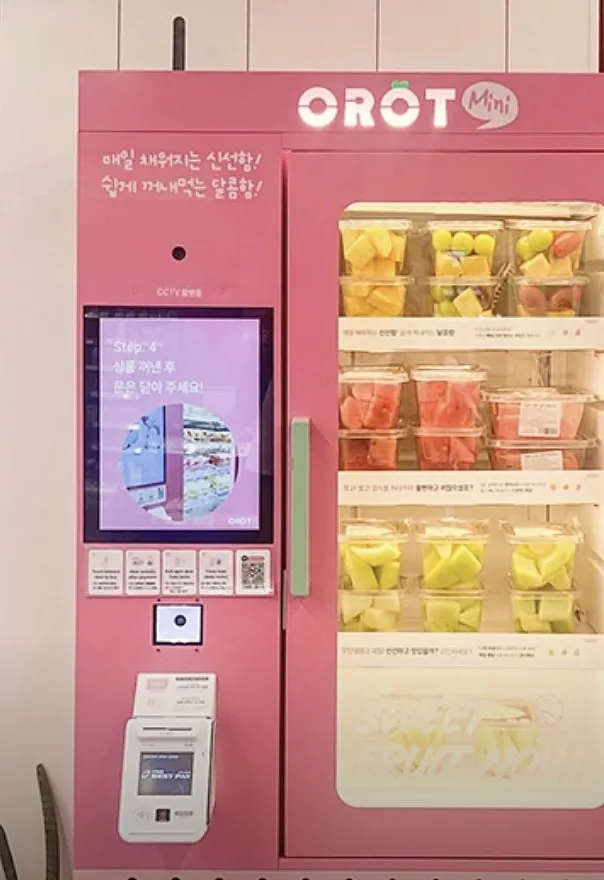
- 1
Lightbox signage
An illuminated OROT mini logo that reads from across a lobby.
- 2
CCTV camera
Records the front of the unit during unattended hours.
- 3
Touchscreen
Shows the menu and walks customers through each step.
- 4
Tap-to-pay reader
Customers tap a card to start the purchase.
- 5
Card terminal
Card payment and receipt printing.
- 6
Door handle
The glass door opens here after payment.
- 7
LED-lit chilled shelves
Keeps cut-fruit cups cold and fully visible.
- Dimensions (W×D×H)
- TBD
- Weight
- TBD
- Chilled temperature range
- TBD °C
- Capacity (shelves / cups)
- TBD
- Power
- TBD V / Hz
- Payment
- Card · tap-to-pay (per-market spec on request)
- Connectivity / remote monitoring
- TBD
Four steps from tap to first bite
Tap & pay
Tap a card on the reader to start.
Door unlocks
The glass door releases.
Pick your fruit
Take the cups you want. A fork comes in every cup.
Close the door
Close the door and you're done, exactly as the unit's own "Step 4" screen says.
※ Settlement method (e.g. automatic item recognition) to be confirmed by GOBRO.
The kiosk is only the last link
OROT fruit moves through one managed flow, from dawn sorting to the shelf. Distributors receive an SOP to rebuild that flow in their own market.
Fruit-prep SOP: sorting criteria, wash and cut process, cup recipes, holding and discard rules, and restock cadence, delivered as documents plus training. Scope details TBD